Summary: in this tutorial, you will learn how to use the MySQL CREATE VIEW statement to create a new view in the database.
Introduction to MySQL CREATE VIEW statement
The CREATE VIEW statement creates a new view in the database. Here is the basic syntax of the CREATE VIEW statement:
CREATE [OR REPLACE] VIEW [db_name.]view_name [(column_list)]
AS
  select-statement;Code language: SQL (Structured Query Language) (sql)
In this syntax:
First, specify the name of the view that you want to create after the CREATE VIEW keywords. The name of the view is unique in a database. Because views and tables in the same database share the same namespace, the name a view cannot the same as the name of an existing table.
Second, use the OR REPLACE option if you want to replace an existing view if the view already exists. If the view does not exist, the OR REPLACE has no effect.
Third, specify a list of columns for the view. By default, the columns of the view are derived from the select list of the SELECT statement. However, you can explicitly specify the column list for the view by listing them in parentheses following the view name.
Finally, specify a SELECT statement that defines the view. The SELECT statement can query data from tables or views. MySQL allows you to use the ORDER BY clause in the SELECT statement but ignores it if you select from the view with a query that has its own ORDER BY clause.
By default, the CREATE VIEW statement creates a view in the current database. If you want to explicitly create a view in a given database, you can qualify the view name with the database name.
MySQL CREATE VIEW examples
Let’s take some example of using the CREATE VIEW statement to create new views.
1) Creating a simple view example
Let’s take a look at the orderDetails table from the sample database:
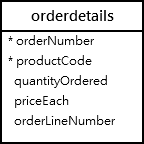
This statement uses the CREATE VIEW statement to create a view that represents total sales per order.
CREATE VIEW salePerOrder AS
    SELECT
        orderNumber,
        SUM(quantityOrdered * priceEach) total
    FROM
        orderDetails
    GROUP by orderNumber
    ORDER BY total DESC;Code language: SQL (Structured Query Language) (sql)
If you use the SHOW TABLE command to view all tables in the classicmodels database, you will see the viewsalesPerOrder is showing up in the list.
SHOW TABLES;Code language: SQL (Structured Query Language) (sql)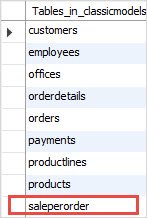
This is because the views and tables share the same namespace as mentioned earlier.
To know which object is a view or table, you use the SHOW FULL TABLES command as follows:
SHOW FULL TABLES;Code language: SQL (Structured Query Language) (sql)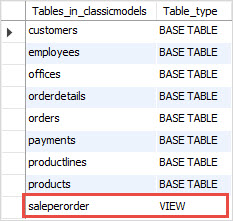
The table_type column in the result set specifies the type of the object: view or table (base table).
If you want to query total sales for each sales order, you just need to execute a simple SELECT statement against the SalePerOrder view as follows:
SELECT * FROM salePerOrder;Code language: SQL (Structured Query Language) (sql)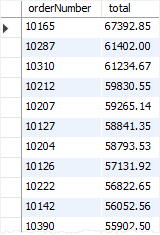
2) Creating a view based on another view example
MySQL allows you to create a view based on another view.
For example, you can create a view called bigSalesOrder based on the salesPerOrder view to show every sales order whose total is greater than 60,000 as follows:
CREATE VIEW bigSalesOrder AS
    SELECT
        orderNumber,
        ROUND(total,2) as total
    FROM
        salePerOrder
    WHERE
        total > 60000;Code language: SQL (Structured Query Language) (sql)
Now, you can query the data from the bigSalesOrder view as follows:
SELECT
    orderNumber,
    total
FROM
    bigSalesOrder;Code language: SQL (Structured Query Language) (sql)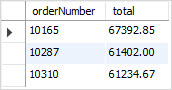
3) Creating a view with join example
The following example uses the CREATE VIEW statement to create a view based on multiple tables. It uses the INNER JOIN clauses to join tables.
CREATE OR REPLACE VIEW customerOrders AS
SELECT
    orderNumber,
    customerName,
    SUM(quantityOrdered * priceEach) total
FROM
    orderDetails
INNER JOIN orders o USING (orderNumber)
INNER JOIN customers USING (customerNumber)
GROUP BY orderNumber;Code language: SQL (Structured Query Language) (sql)
This statement selects data from the customerOrders view:
SELECT * FROM customerOrders
ORDER BY total DESC;Code language: SQL (Structured Query Language) (sql)
This picture shows the partial output:

4) Creating a view with a subquery example
The following example uses the CREATE VIEW statement to create a view whose SELECT statement uses a subquery. The view contains products whose buy prices are higher than the average price of all products.
CREATE VIEW aboveAvgProducts AS
    SELECT
        productCode,
        productName,
        buyPrice
    FROM
        products
    WHERE
        buyPrice > (
            SELECT
                AVG(buyPrice)
            FROM
                products)
    ORDER BY buyPrice DESC;Code language: SQL (Structured Query Language) (sql)
This query data from the aboveAvgProducts is simple as follows:
SELECT * FROM aboveAvgProducts;Code language: SQL (Structured Query Language) (sql)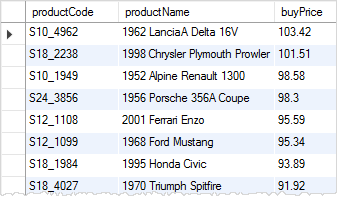
5) Creating a view with explicit view columns example
This statement uses the CREATE VIEW statement to create a new view based on the customers and orders tables with explicit view columns:
CREATE VIEW customerOrderStats (
   customerName ,
   orderCount
)
AS
    SELECT
        customerName,
        COUNT(orderNumber)
    FROM
        customers
            INNER JOIN
        orders USING (customerNumber)
    GROUP BY customerName;Code language: SQL (Structured Query Language) (sql)
This query returns data from the customerOrderStats view:
SELECT
    customerName,
    orderCount
FROM
    customerOrderStats
ORDER BY
	orderCount,
    customerName;Code language: SQL (Structured Query Language) (sql)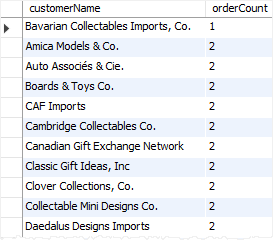
In this tutorial, we have shown you how to use the MySQL CREATE VIEW statement to create views in the database.

