Summary: in this tutorial, you will learn about MySQL views and how to manipulate views effectively.
Introduction to MySQL Views
Let’s see the following tables customers and payments from the sample database.
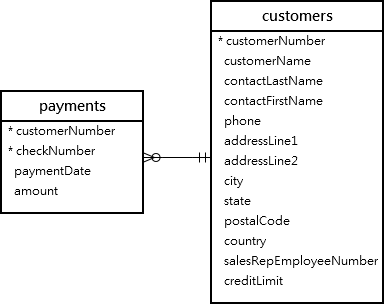
This query returns data from both tables customers and payments using the inner join:
SELECT
    customerName,
    checkNumber,
    paymentDate,
    amount
FROM
    customers
INNER JOIN
    payments USING (customerNumber);Code language: SQL (Structured Query Language) (sql)
Here is the output:
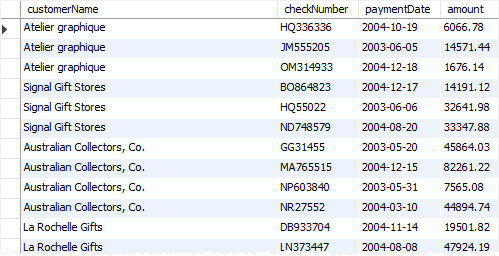
Next time, if you want to get the same information including customer name, check number, payment date, and amount, you need to issue the same query again.
One way to do this is to save the query in a file, either .txt or .sql file so that later you can open and execute it from MySQL Workbench or any other MySQL client tools.
A better way to do this is to save the query in the database server and assign a name to it. This named query is called a database view, or simply, view.
By definition, a view is a named query stored in the database catalog.
To create a new view you use the CREATE VIEW statement. This statement creates a view customerPayments based on the above query above:
CREATE VIEW customerPayments
AS
SELECT
    customerName,
    checkNumber,
    paymentDate,
    amount
FROM
    customers
INNER JOIN
    payments USING (customerNumber);
Code language: SQL (Structured Query Language) (sql)
After you execute the CREATE VIEW statement, MySQL creates the view and stores it in the database.
Now, you can reference the view as a table in SQL statements. For example, you can query data from the customerPayments view using the SELECT statement:
SELECT * FROM customerPayments;
Code language: SQL (Structured Query Language) (sql)
As you can see, the syntax is much simpler.
Note that a view does not physically store the data. When you issue the SELECT statement against the view, MySQL executes the underlying query specified in the view’s definition and returns the result set. For this reason, sometimes, a view is referred to as a virtual table.
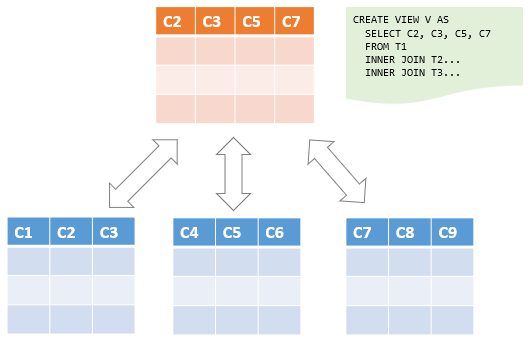
MySQL allows you to create a view based on a SELECT statement that retrieves data from one or more tables. This picture illustrates a view based on columns of multiple tables:
In addition, MySQL even allows you to create a view that does not refer to any table. But you will rarely find this kind of view in practice.
For example, you can create a view called daysofweek that return 7 days a week by executing the following query:
CREATE VIEW daysofweek (day) AS
    SELECT 'Mon'
    UNION
    SELECT 'Tue'
    UNION
    SELECT 'Web'
    UNION
    SELECT 'Thu'
    UNION
    SELECT 'Fri'
    UNION
    SELECT 'Sat'
    UNION
    SELECT 'Sun';
Code language: SQL (Structured Query Language) (sql)
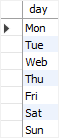
You can query data from the daysofweek view as follows:
SELECT * FROM daysofweek;Code language: SQL (Structured Query Language) (sql)This picture shows the output:
Advantages of MySQL Views
MySQL views bring the following advantages.
1) Simplify complex query
Views help simplify complex queries. If you have any frequently used complex query, you can create a view based on it so that you can reference the view by using a simple SELECT statement instead of typing the query all over again.
2) Make the business logic consistent
Suppose you have to repeatedly write the same formula in every query. Or you have a query that has complex business logic. To make this logic consistent across queries, you can use a view to store the calculation and hide the complexity.
3) Add extra security layers
A table may expose a lot of data including sensitive data such as personal and banking information.
By using views and privileges, you can limit which data users can access by exposing only the necessary data to them.
For example, the table employees may contain SSN and address information, which should be accessible by the HR department only.
To expose general information such as first name, last name, and gender to the General Administration (GA) department, you can create a view based on these columns and grant the users of the GA department the view, not the entire table employees .
4) Enable backward compatibility
In legacy systems, views can enable backward compatibility.
Suppose, you want to normalize a big table into many smaller ones. And you don’t want to impact the current applications that reference the table.
In this case, you can create a view whose name is the same as the table based on the new tables so that all applications can reference the view as if it were a table.
Note that a view and table cannot have the same name so you need to drop the table first before creating a view whose name is the same as the deleted table.
Managing views in MySQL
- Create views – show you how to use the
CREATE VIEWstatement to create a new view in the database. - Understand view processing algorithms – learn how MySQL processes a view.
- Create updatable views – learn how to create updatable views.
- Create views with a
WITH CHECK OPTION– ensure the consistency of views using theWITH CHECK OPTIONclause. LOCAL & CASCADEDandWITH CHECK OPTION– specify the scope of the check withLOCALandCASCADEDoptions.- Show views – provide ways to find views in a database.
- Show create view – learn how to display the statement that creates a view.
- Rename views – change the name of a view to another.
- Drop views – guide you on how to remove one or more existing views.

